서론
Rx에서는 선택한 셀의 IndexPath를 반환하는 ItemSelected, 선택한 셀의 IndexPath를 기반으로 데이터 모델을 반환하는 ModelSelected 메서드를 제공한다.
ItemSelected는 collectionView(:didSelectItemAtIndexPath:), tableView(:didSelectRowAtIndexPath:)를 delegate를 래핑 한 메서드이고, ModelSelected는 그러한 ItemSelected를 한 번 더 래핑 한 메서드이다.

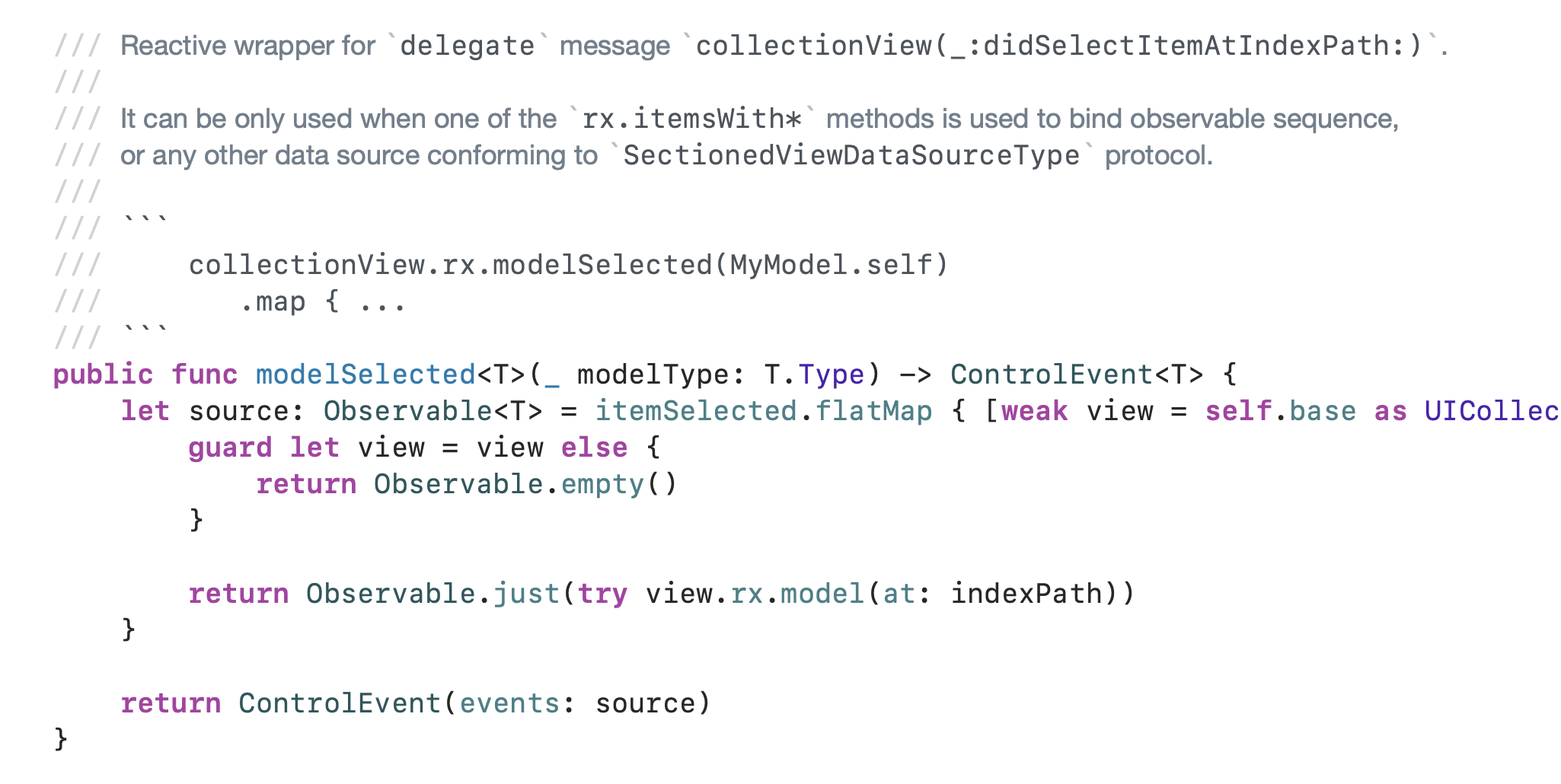
이 두 메서드를 사용해서 뷰 컨트롤러에 Delegate를 채택하지 않아도, 셀이 선택되면 해당 셀에 대한 정보(인덱스패스, 데이터)를 조작할 수 있게 된다.
기본적인 itemSelected, modelSelected 사용법
아래는 배경색을 지닌 셀을 보여주는 간단한 코드
import UIKit
import SnapKit
import RxSwift
import RxCocoa

final class Cell: UITableViewCell {
    static let identifier = "Cell"
}

final class ViewController: UIViewController {
    private let disposeBag = DisposeBag()
    private let tableView = UITableView()
    private let data: [UIColor] = [.systemRed, .systemPink, .systemOrange, .systemBlue]

    override func viewDidLoad() {
        super.viewDidLoad()
        view.backgroundColor = .systemBackground

        view.addSubview(tableView)

        tableView.snp.makeConstraints {
            $0.edges.equalToSuperview()
        }

        tableView.register(Cell.self, forCellReuseIdentifier: Cell.identifier)

        Observable.just(data)
            .bind(to: tableView.rx.items(cellIdentifier: Cell.identifier, cellType: Cell.self)) { row, item, cell in
                cell.contentView.backgroundColor = item
            }
            .disposed(by: disposeBag)
    }
}


셀 클릭 시 아래와 같이 셀에 대한 인덱스패스와 색이 출력된다.
tableView.rx.itemSelected
    .bind {
        print("indexPath:", $0)
    }
    .disposed(by: disposeBag)

tableView.rx.modelSelected(UIColor.self)
    .bind {
        print("UIColor:", $0)
    }
    .disposed(by: disposeBag)
indexPath: [0, 0]
UIColor: <UIDynamicCatalogSystemColor: 0x600001740300; name = systemRedColor>Diffable DataSource
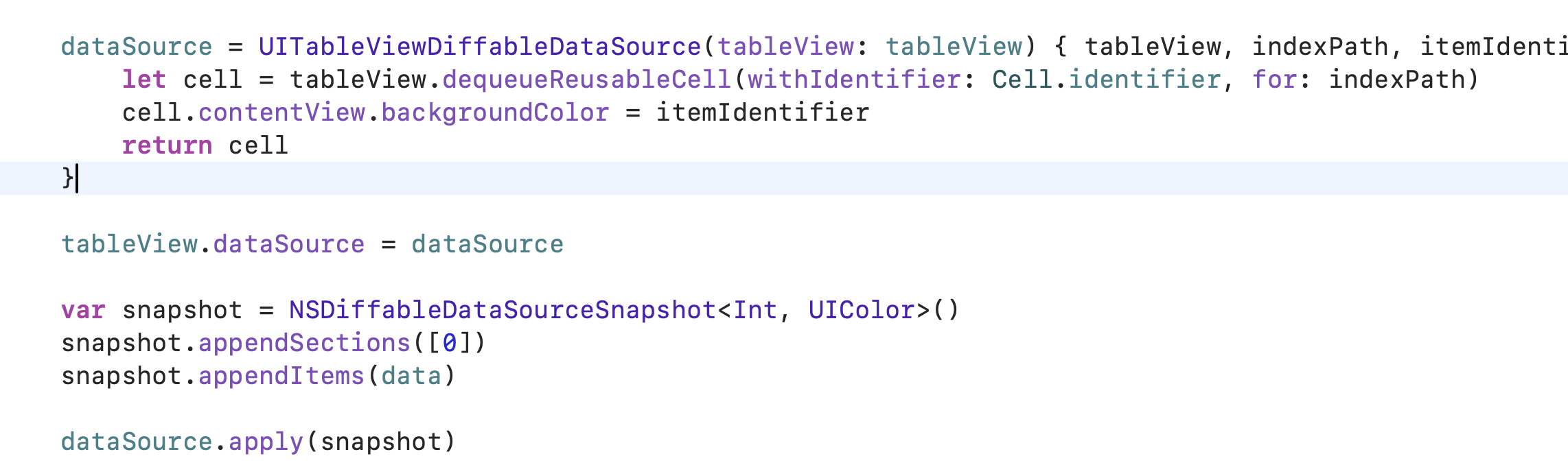
위 코드를 디퍼블 데이터소스를 사용하는 코드로 바꾸고, 셀을 클릭한다면?
dataSource = UITableViewDiffableDataSource(tableView: tableView) { tableView, indexPath, itemIdentifier in
    let cell = tableView.dequeueReusableCell(withIdentifier: Cell.identifier, for: indexPath)
    cell.contentView.backgroundColor = itemIdentifier
    return cell
}

tableView.dataSource = dataSource

var snapshot = NSDiffableDataSourceSnapshot<Int, UIColor>()
snapshot.appendSections([0])
snapshot.appendItems(data)

dataSource.apply(snapshot)
modelSelected로 인해서 fatalError가 발생한다.

modelSelected와 Diffable DataSource의 한계점
디퍼블 데이터소스는 인덱스패스가 아닌 스냅샷을 기준으로 동작한다.
Rx에서 modelSelected는 인덱스패스 접근 기반으로 구현되어 있기 때문에 디퍼블 데이터소스 방식과 호환되지 않아 fatalError를 반환하는 것

그렇기 때문에 "다른 화면에 값을 전달한다." 등의 동작을 위해 itemSelected로 인덱스패스를 받고, 이를 통해 데이터의 인덱스에 접근하는 식의 데이터를 찾아가는 식으로 사용했으며, 이를 좀 더 효율적으로 하기 위해 확장했다.
구현 아이디어
- itemSelected를 통해 IndexPath를 얻을 수 있음
- 데이터소스에 IndexPath를 인자로 아이템을 반환하는 메서드가 있음
func itemIdentifier(for indexPath: IndexPath) -> Any?
이 둘을 통해 테이블 뷰 혹은 컬렉션 뷰에서 아이템의 인덱스패스를 받고, 데이터소스에서 해당 인덱스패스의 아이템을 찾아서 반환하기.
구현 코드
import UIKit
import RxSwift
import RxCocoa

extension Reactive where Base: UITableView {
    func sectionSelected<SectionIdentifierType, ItemIdentifierType>(_ dataSource: UITableViewDiffableDataSource<SectionIdentifierType, ItemIdentifierType>) -> ControlEvent<SectionIdentifierType> where SectionIdentifierType: Hashable, ItemIdentifierType: Hashable {
        let source: Observable<SectionIdentifierType> = self.itemSelected
            .compactMap { [weak dataSource] indexPath in
                dataSource?.sectionIdentifier(for: indexPath.section)
            }

        return ControlEvent(events: source)
    }

    func itemSelected<SectionIdentifierType, ItemIdentifierType>(_ dataSource: UITableViewDiffableDataSource<SectionIdentifierType, ItemIdentifierType>) -> ControlEvent<ItemIdentifierType> where SectionIdentifierType: Hashable, ItemIdentifierType: Hashable {
        let source: Observable<ItemIdentifierType> = self.itemSelected
            .compactMap { [weak dataSource] indexPath in
                dataSource?.itemIdentifier(for: indexPath)
            }

        return ControlEvent(events: source)
    }
}

extension Reactive where Base: UICollectionView {
    func sectionSelected<SectionIdentifierType, ItemIdentifierType>(_ dataSource: UICollectionViewDiffableDataSource<SectionIdentifierType, ItemIdentifierType>) -> ControlEvent<SectionIdentifierType> where SectionIdentifierType: Hashable, ItemIdentifierType: Hashable {
        let source: Observable<SectionIdentifierType> = self.itemSelected
            .compactMap { [weak dataSource] indexPath in
                dataSource?.sectionIdentifier(for: indexPath.section)
            }

        return ControlEvent(events: source)
    }

    func itemSelected<SectionIdentifierType, ItemIdentifierType>(_ dataSource: UICollectionViewDiffableDataSource<SectionIdentifierType, ItemIdentifierType>) -> ControlEvent<ItemIdentifierType> where SectionIdentifierType: Hashable, ItemIdentifierType: Hashable {
        let source: Observable<ItemIdentifierType> = self.itemSelected
            .compactMap { [weak dataSource] indexPath in
                dataSource?.itemIdentifier(for: indexPath)
            }

        return ControlEvent(events: source)
    }
}
사용 예
tableView.rx.itemSelected(dataSource)
    .bind {
        print("UIColor:", $0)
    }
    .disposed(by: disposeBag)
indexPath: [0, 0]
UIColor: <UIDynamicCatalogSystemColor: 0x600001741fc0; name = systemRedColor>전, 후 코드 비교
/// 전
tableView.rx.itemSelected
    .compactMap { [weak self] indexPath in
        guard let self else { return nil }
        return self.data[indexPath.row]
    }
    .bind {
        print("UIColor:", $0)
    }
    .disposed(by: disposeBag)

/// 후
tableView.rx.itemSelected(dataSource)
    .bind {
        print("UIColor:", $0)
    }
    .disposed(by: disposeBag)
UIColor: <UIDynamicCatalogSystemColor: 0x600001712180; name = systemRedColor>
UIColor: <UIDynamicCatalogSystemColor: 0x600001712180; name = systemRedColor>참고
https://developer.apple.com/documentation/uikit/uitableviewdelegate/tableview(_:didselectrowat:)
https://developer.apple.com/documentation/uikit/uicollectionviewdelegate/collectionview(_:didselectitemat:)?language=objc
https://developer.apple.com/documentation/uikit/uicollectionviewdiffabledatasourcereference/itemidentifier(for:)
'Swift > UIKit' 카테고리의 다른 글
| UIKit: 중첩 스크롤 뷰 구현하기 (0) | 2025.10.29 |
|---|---|
| UIKit: 원형 컨텍스트 메뉴 라이브러리 (0) | 2025.10.21 |
| UIKit: DataSource, DiffableDataSource (1) | 2025.08.30 |
| UIKit: UITextView (1) | 2025.08.30 |
| UIControl 이벤트를 Combine 퍼블리셔로 만들기 (0) | 2025.08.20 |